

Plans and billing live in Settings, which is part of the admin workspace. Only admins can turn on the AI transcription add-on. Agents use a separate agent workspace without billing pages.
Plans
TalkChief offers three self-serve plans and a custom option for larger companies.
Current prices are shown on each plan card in Settings > Plans and on the TalkChief pricing page. Some limits, such as the number of call queues you can create, depend on your plan.
CoWork on every plan
TalkChief CoWork is included in all three plans. What you get depends on the plan.
Essential and Growth members use CoWork as a phone-only desktop app. Professional adds team chat, meetings, the web app, and the iOS and Android apps. See CoWork for details.
Change your plan
1
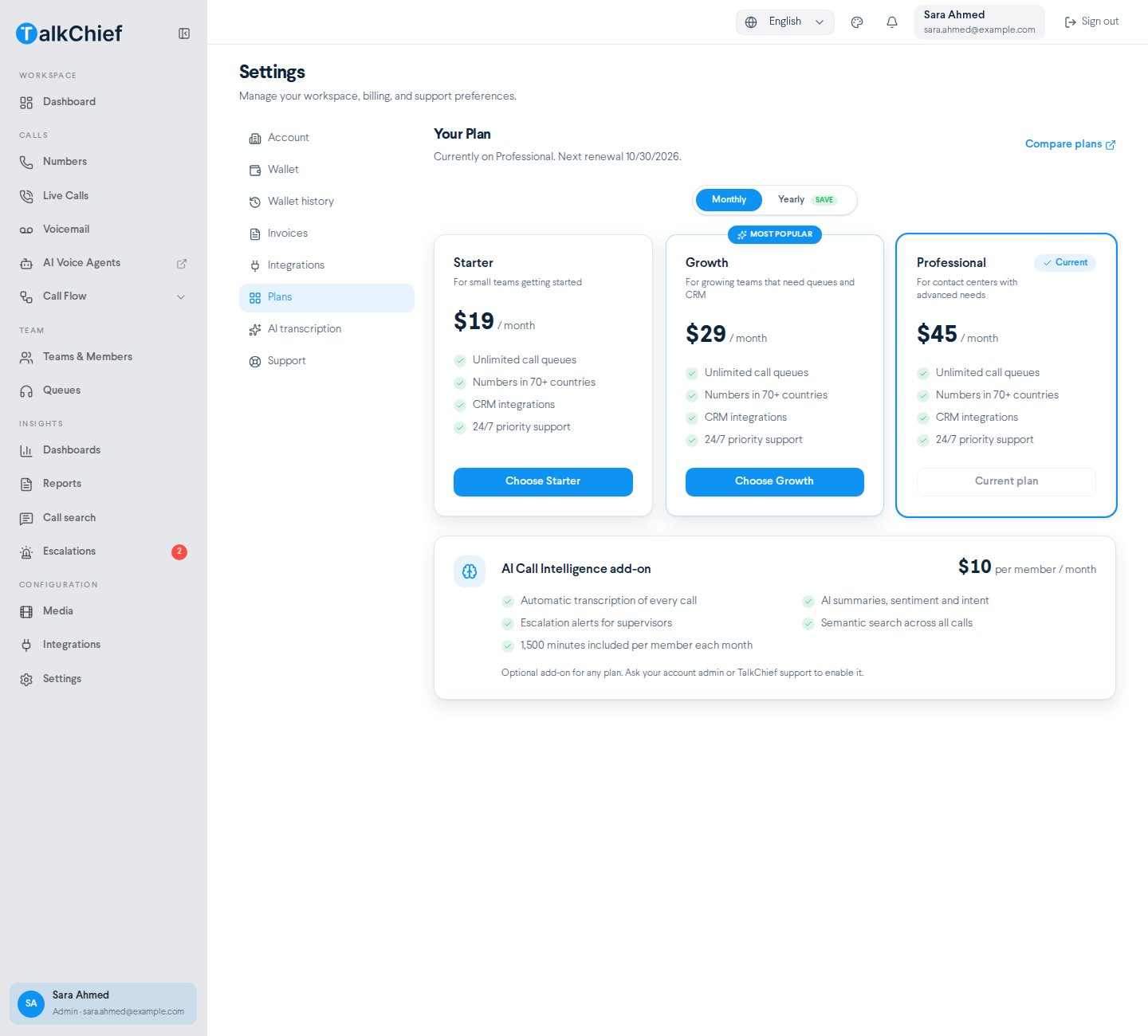
Open the Plans page
In the sidebar, go to Configuration > Settings, then select Plans. The header shows your current plan and the next renewal date.
2
Pick a billing cycle
Select Monthly or Yearly.
3
Choose a plan
Select Choose followed by the plan name, for example Choose Growth. A Plan change requested message confirms the request. Your current plan is marked Current plan.
Free trial
New companies start with a 7-day free trial. Sign up at talkchief.io/register. During the trial, the list of countries you can buy numbers in is limited. The full list opens after you upgrade. When the trial ends, TalkChief asks you to pick a plan in Settings > Plans to keep using your workspace.AI transcription add-on
AI transcription turns your recorded calls into text, then adds summaries, search, and escalation alerts. On the Plans page it appears as the AI Call Intelligence add-on. You turn it on in Settings > AI transcription.
If you turn the add-on off, coverage continues until the end of the period you already paid for. For setup steps, see AI transcription.
AI voice agents
AI voice agents answer and place calls for you. You build and manage them at agents.talkchief.io, which opens from AI Voice Agents in the sidebar.Power Dialer
Power Dialer is an on-demand add-on for Enterprise companies. It is not available as a self-serve option. See Power Dialer or contact sales.FAQ
Can I use AI transcription on the Essential plan?
Can I use AI transcription on the Essential plan?
No. AI transcription is available on the Growth and Professional plans, including trials. Upgrade in Settings > Plans first.
Do unused AI transcription minutes roll over?
Do unused AI transcription minutes roll over?
No. Each member gets 1,500 included minutes per calendar month. Minutes beyond that cost $0.01 per minute from your wallet.
Which plans include CoWork?
Which plans include CoWork?
All of them. Essential and Growth include the CoWork desktop app for Windows and macOS with your business phone: dialer, contacts, recents, and voicemail. Professional adds team chat, meetings, CoWork on the web, and the iOS and Android apps. See CoWork.
Why did my AI voice agent call not start?
Why did my AI voice agent call not start?
AI voice agent calls need a wallet balance of at least $10. Top up your wallet in Settings > Wallet, or turn on Auto Top-up.
How do I get Power Dialer?
How do I get Power Dialer?
Power Dialer is available on request for Enterprise companies. Contact sales to discuss it.
Related pages
AI transcription
Turn on transcription for your company, teams, or members.
CoWork
See what CoWork includes on each plan.
Quickstart
Set up your workspace and make your first call.
Power Dialer
Learn about the Enterprise outbound add-on.
Introduction
Get an overview of everything TalkChief does.