

You need a TalkChief admin or supervisor account to open AI Voice Agents. Calls are charged to your TalkChief wallet, which must hold at least $10.
Open AI Voice Agents
1
Sign in to TalkChief
Sign in to the TalkChief web app with an admin or supervisor account.
2
Open the agents workspace
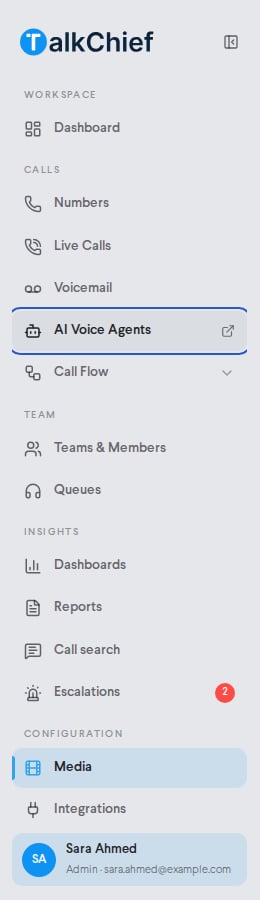
In the sidebar, under calls, click AI Voice Agents. The agents workspace opens in a new tab at agents.talkchief.io.
Inbound agents and outbound campaigns
The agents workspace has two ways to work.Find your way around
The sidebar groups every page by task.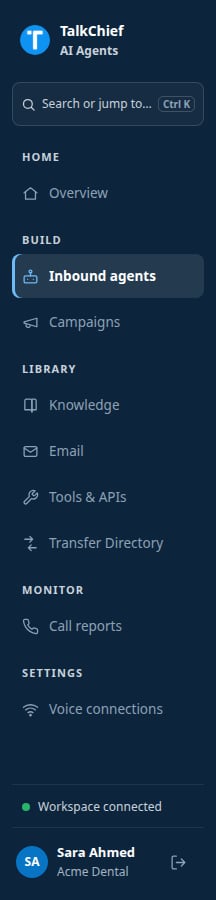
Pricing
AI voice agent calls cost $0.15 per connected minute, or the usage-based cost of the call if that is higher. The charge follows the call’s connected AI time.- Failed, busy, and unanswered attempts have no per-minute charge.
- When the agent transfers a caller to a person, charging stops at the transfer.
- Your wallet must hold at least $10 before the agent takes or places a call.
What agents can and cannot do
Agents can:- Speak English, Arabic, or Hebrew, or detect the caller’s language.
- Search documents you grant them.
- Call your business systems through Business APIs and MCP connectors.
- Send email from your workspace sender.
- Transfer to approved people and queues, end calls, send keypad tones, and record do-not-call requests.
FAQ
How many agents can I create?
How many agents can I create?
Your plan sets an AI agent limit. The Inbound agents page shows how many you use, for example “2 of 3 AI agents”. To get more, delete an agent you no longer need or ask TalkChief support to raise the limit.
Do changes need a publish step?
Do changes need a publish step?
Not for inbound agents. Click Save changes and new calls use the updated settings. Outbound caller profiles have a Publish caller profile step before their first campaign.
Can the agent say it is an AI?
Can the agent say it is an AI?
Yes. For inbound agents, turn on Disclose AI when asked. In outbound campaigns the agent always answers truthfully if a lead asks directly.
Related pages
Create an agent
Set the persona, greeting, language, and voice.
Add an agent to a call flow
Send calls on your numbers to an inbound agent.
Outbound campaigns
Call a lead list with a campaign.
Call reports
Review transcripts and charges.