

Admins see the full workspace described below. Agents sign in to a smaller agent workspace with their own Dashboard, Queues, and Settings. Some features depend on your plan. See Plans and pricing.
How the workspace is organized
The sidebar groups every page into five areas.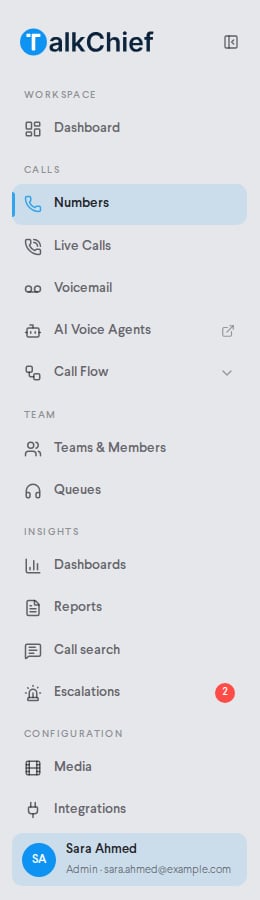
What you can do with TalkChief
Business phone
Buy numbers, build call flows, and route calls by working hours.
Contact center
Create queues, choose a ring strategy, and monitor live calls.
AI transcription
Turn recorded calls into transcripts, summaries, and searchable text.
Integrations
Connect HubSpot, Pipedrive, Zoho, Zoho PhoneBridge, Powerlink, or Comeunity.
Analytics and reports
Track call volume, answer rates, queue performance, and costs.
Developer platform
Use click-to-call, the transcription API, and call webhooks.
AI voice agents
AI voice agents answer inbound calls and run outbound calling campaigns for you. You build them in a separate app at agents.talkchief.io. Select AI Voice Agents in the sidebar to open it in a new tab. To send inbound calls to an agent, add an AI Agent step to a number’s call flow. AI voice agents cost $0.15 per connected minute, or the usage-based cost if that is higher, charged from your wallet. See Plans and pricing.AI transcription
AI transcription turns recorded calls into a conversation you can read, search, and summarize. It also flags calls that may need a supervisor in Escalations. It is an add-on for the Growth and Professional plans. See AI transcription.Get started
1
Sign up
Create your company at talkchief.io/register. Every new company starts with a 7-day free trial.
2
Complete onboarding
Enter your company information and working hours, then pick your first number.
3
Invite your team and route calls
Add members in Teams & Members, then set up Queues and call flows.
FAQ
Do I need to install anything?
Do I need to install anything?
No. You can make and receive calls in the browser with the Web Phone. Desktop apps for Windows and macOS and mobile apps for iOS and Android are also available.
Where do I build AI voice agents?
Where do I build AI voice agents?
At agents.talkchief.io. Open it from AI Voice Agents in the sidebar.
Which CRMs does TalkChief connect to?
Which CRMs does TalkChief connect to?
HubSpot, Pipedrive, Zoho, Zoho PhoneBridge, Powerlink, and Comeunity. Connect them in Configuration > Integrations.
Related pages
Quickstart
Go from sign-up to your first call.
Plans and pricing
Compare plans and add-on pricing.