> ## Documentation Index
> Fetch the complete documentation index at: https://docs.talkchief.io/llms.txt
> Use this file to discover all available pages before exploring further.
# Deep Insights: call topics, issues and churn signals
> See why customers call, which issues and products drive unresolved calls, which competitors they mention, and who keeps calling back, across all analyzed calls.
The **Deep Insights** tab connects what customers talk about across your calls: why they call, which issues and products come up, which competitors they mention, who calls back, and how those calls end. It turns individual transcripts into a picture of your business, so you can see which problems drive unresolved calls and churn risk. This page is for admins and supervisors.
Deep Insights is available when [AI transcription](/ai/ai-transcription) is on for your company, a team, or a member. It is included with AI transcription at no extra cost. Admins see the whole company. Supervisors see only their own teams. Agents don't see the tab.
## How it works
After a call is transcribed, TalkChief records the call reason and outcome. For calls with at least 30 seconds of audio and at least four turns of conversation, it also picks out the **issues** the customer raised, the **products** they were about, any **competitors** mentioned, and **commitments** your member made. The same issue said in different words, or in another language, is grouped under one English label, so trends add up across Arabic, Hebrew, English, and the other supported languages.
TalkChief is designed to keep personal names, phone numbers, and email addresses out of topic labels. Repeat callers appear only as **Caller #1**, **Caller #2**, and so on; their numbers are never shown.
## Open Deep Insights
Go to **Insights** > **Dashboards** and select the **Deep Insights** tab, next to **AI insights**.
Choose a date **Range**, or set **From** and **To**. The default is the last 90 days; a range can cover up to 180 days. Optionally pick a **Team** and a **Member**.
Select **Apply**. **Reset** clears the **Team** and **Member** filters and sets the **Range** back to **This Month**.
 ## Key numbers
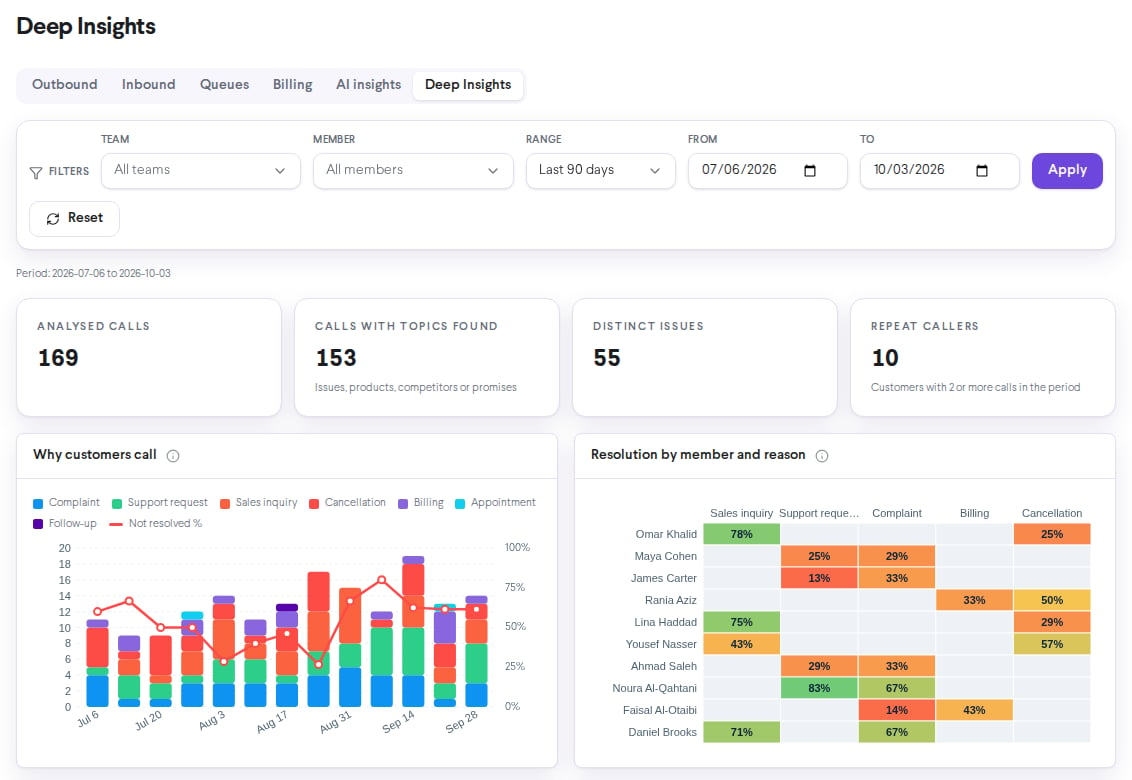
| Card | What it shows |
| - | - |
| **Analysed calls** | Analyzed calls in the period |
| **Calls with topics found** | Calls where at least one issue, product, competitor, or promise was found |
| **Distinct issues** | Different customer issues raised in the period |
| **Repeat callers** | Customers with 2 or more calls in the period |
## Charts
| Chart | What it shows | Business question |
| - | - | - |
| **Why customers call** | Calls per week by reason, with a red line for the share of calls **Not resolved** (out of calls with a clear outcome) | Is demand changing, and are we solving what customers call about? |
| **Resolution by member and reason** | Share of calls resolved per member and call reason, for the top 10 members. A cell needs at least 5 calls with a clear outcome | Who needs coaching, and on which type of call? |
| **Top customer issues** | The 6 most frequent issues, calls per week | Which problems drive call volume, and is one getting worse? |
| **Issue → product → outcome** | The 8 most frequent issues, the product each was about, and how the calls ended: **Resolved**, **Not resolved**, **Unclear**, or **Escalated** | Which products and issues produce unresolved and escalated calls? |
| **Competitor mentions and churn risk** | Calls mentioning each competitor and the share of those calls flagged as churn risk | Which competitors are pulling customers away? |
| **Repeat callers and their issues** | The 8 repeat callers with the most calls (customers with 2 or more calls in the period and at least one issue found), each with their call count and up to 4 issues. More callers and issues are shown as a count | Which problems aren't fixed on the first call? |
Hover over an issue, product, or competitor to see the customer's original wording.
## Key numbers
| Card | What it shows |
| - | - |
| **Analysed calls** | Analyzed calls in the period |
| **Calls with topics found** | Calls where at least one issue, product, competitor, or promise was found |
| **Distinct issues** | Different customer issues raised in the period |
| **Repeat callers** | Customers with 2 or more calls in the period |
## Charts
| Chart | What it shows | Business question |
| - | - | - |
| **Why customers call** | Calls per week by reason, with a red line for the share of calls **Not resolved** (out of calls with a clear outcome) | Is demand changing, and are we solving what customers call about? |
| **Resolution by member and reason** | Share of calls resolved per member and call reason, for the top 10 members. A cell needs at least 5 calls with a clear outcome | Who needs coaching, and on which type of call? |
| **Top customer issues** | The 6 most frequent issues, calls per week | Which problems drive call volume, and is one getting worse? |
| **Issue → product → outcome** | The 8 most frequent issues, the product each was about, and how the calls ended: **Resolved**, **Not resolved**, **Unclear**, or **Escalated** | Which products and issues produce unresolved and escalated calls? |
| **Competitor mentions and churn risk** | Calls mentioning each competitor and the share of those calls flagged as churn risk | Which competitors are pulling customers away? |
| **Repeat callers and their issues** | The 8 repeat callers with the most calls (customers with 2 or more calls in the period and at least one issue found), each with their call count and up to 4 issues. More callers and issues are shown as a count | Which problems aren't fixed on the first call? |
Hover over an issue, product, or competitor to see the customer's original wording.
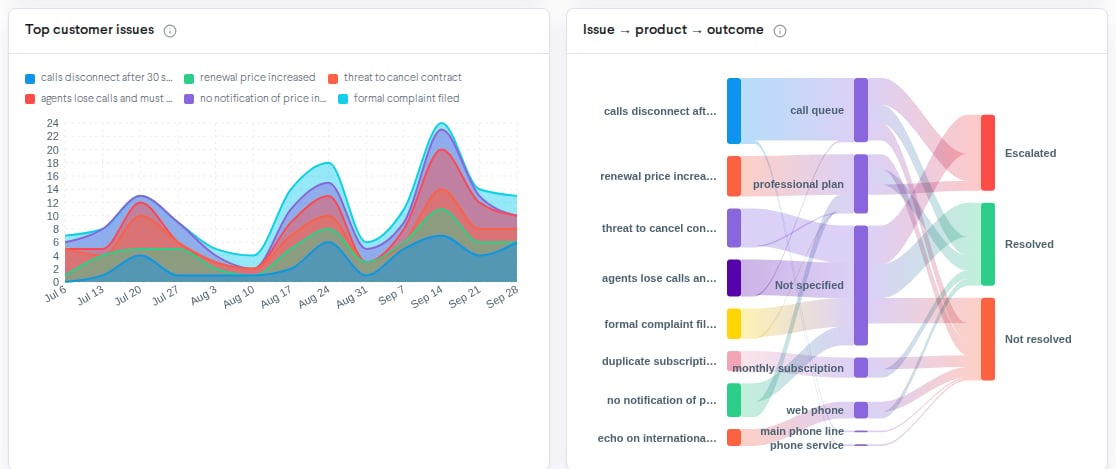
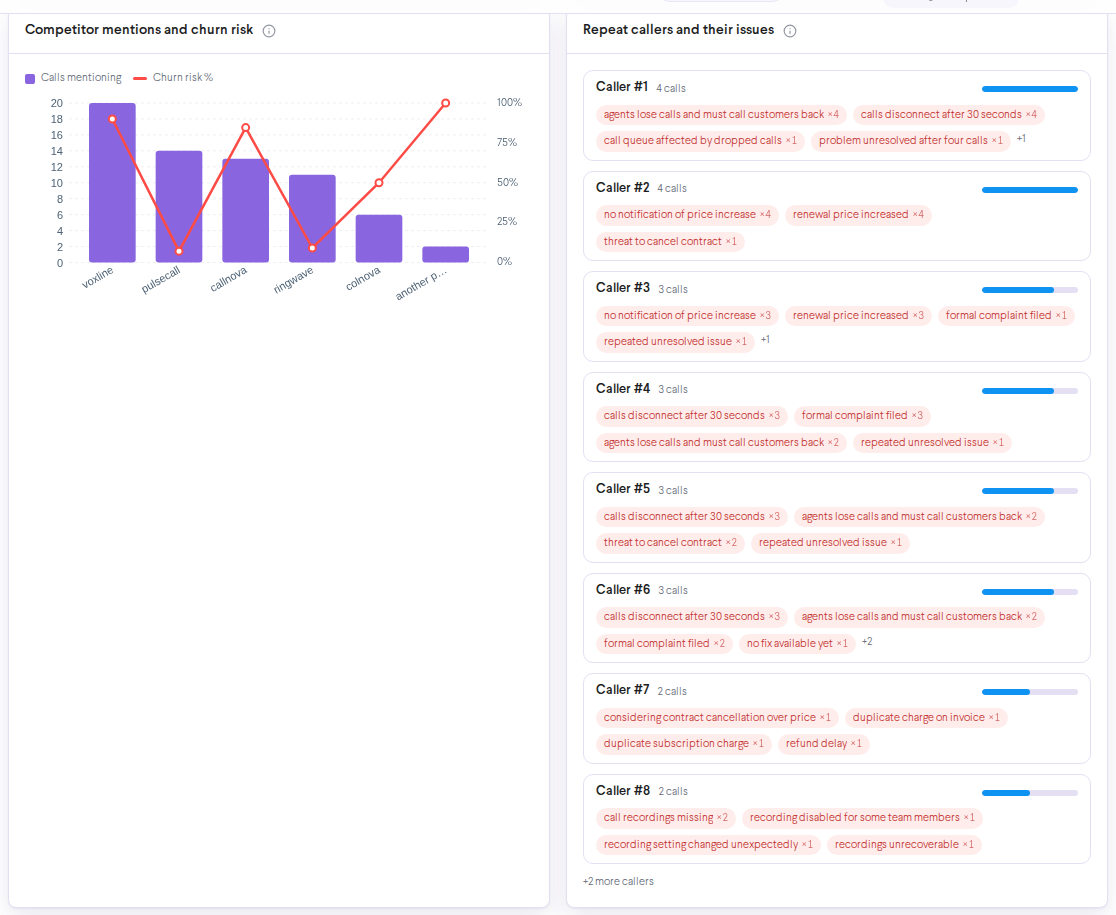 Start with **Issue → product → outcome**. An issue with a wide **Not resolved** or **Escalated** band is where a process fix or a help article saves the most calls. Then check **Repeat callers**: a caller with several calls on one issue is a customer to call back first.
## Chart explanations
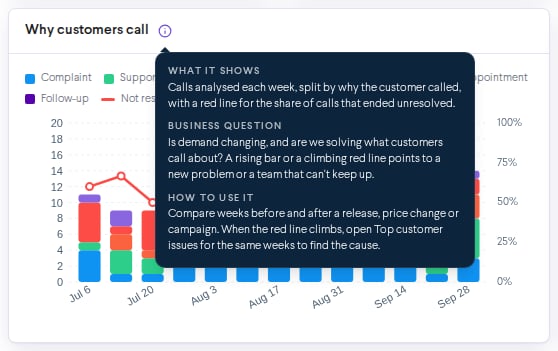
Every chart on the **Deep Insights** and **AI insights** tabs has an info button (**i**) next to its title. Hover over it, or tap it on a phone, to see three short sections:
* **What it shows**: what the chart measures.
* **Business question**: the question the chart answers for your business.
* **How to use it**: what to look for and what to do next.
Start with **Issue → product → outcome**. An issue with a wide **Not resolved** or **Escalated** band is where a process fix or a help article saves the most calls. Then check **Repeat callers**: a caller with several calls on one issue is a customer to call back first.
## Chart explanations
Every chart on the **Deep Insights** and **AI insights** tabs has an info button (**i**) next to its title. Hover over it, or tap it on a phone, to see three short sections:
* **What it shows**: what the chart measures.
* **Business question**: the question the chart answers for your business.
* **How to use it**: what to look for and what to do next.
 ## On a phone
Deep Insights works on phones and tablets. Charts with many columns, such as **Resolution by member and reason** and **Issue → product → outcome**, show **Swipe sideways to see the whole chart**: swipe left or right inside the chart to see the rest.
## Who sees what
| Role | What they see |
| - | - |
| **Admin** | The whole company |
| **Supervisor** | Only the teams they belong to or supervise; the **Team** and **Member** filters only narrow this further |
| **Agent** | No Deep Insights tab |
Deep Insights is generated automatically. Use it to find patterns and the calls worth reviewing, not as the only basis for decisions. Open the transcript and recording before you act.
## Troubleshooting
AI transcription is off for your whole company, or you are signed in as an agent. Turn on AI transcription for at least one team or member, and the tab appears within a few minutes.
No calls in the period have been analyzed yet. New calls appear within minutes after they are transcribed. Pick a longer range, or check AI transcription coverage.
The member and reason grid needs at least 5 calls with a clear outcome in a cell before it shows a rate. Pick a longer range or fewer filters.
## Related
Sentiment, resolution, escalations, and scorecards.
Find the calls behind an issue.
Review and acknowledge escalated calls.
Choose which calls are analyzed.
This documentation is built and hosted on [Mintlify](https://mintlify.com), a developer documentation platform.
## On a phone
Deep Insights works on phones and tablets. Charts with many columns, such as **Resolution by member and reason** and **Issue → product → outcome**, show **Swipe sideways to see the whole chart**: swipe left or right inside the chart to see the rest.
## Who sees what
| Role | What they see |
| - | - |
| **Admin** | The whole company |
| **Supervisor** | Only the teams they belong to or supervise; the **Team** and **Member** filters only narrow this further |
| **Agent** | No Deep Insights tab |
Deep Insights is generated automatically. Use it to find patterns and the calls worth reviewing, not as the only basis for decisions. Open the transcript and recording before you act.
## Troubleshooting
AI transcription is off for your whole company, or you are signed in as an agent. Turn on AI transcription for at least one team or member, and the tab appears within a few minutes.
No calls in the period have been analyzed yet. New calls appear within minutes after they are transcribed. Pick a longer range, or check AI transcription coverage.
The member and reason grid needs at least 5 calls with a clear outcome in a cell before it shows a rate. Pick a longer range or fewer filters.
## Related
Sentiment, resolution, escalations, and scorecards.
Find the calls behind an issue.
Review and acknowledge escalated calls.
Choose which calls are analyzed.
This documentation is built and hosted on [Mintlify](https://mintlify.com), a developer documentation platform.