> ## Documentation Index
> Fetch the complete documentation index at: https://docs.talkchief.io/llms.txt
> Use this file to discover all available pages before exploring further.
# AI call insights dashboard: sentiment and scorecards
> Track customer sentiment, resolution rate, escalations, and call reasons across analyzed calls, and compare teams and members with AI scorecards.
The **AI insights** tab turns your analyzed calls into trends. It shows how customers feel, which calls get resolved, why customers call, and where escalations come from. Team and member tables let you compare quality across your contact center. This page is for admins and supervisors.
AI insights need [AI transcription](/ai/ai-transcription). Admins see the whole company. Supervisors see their own teams.
## Open AI insights
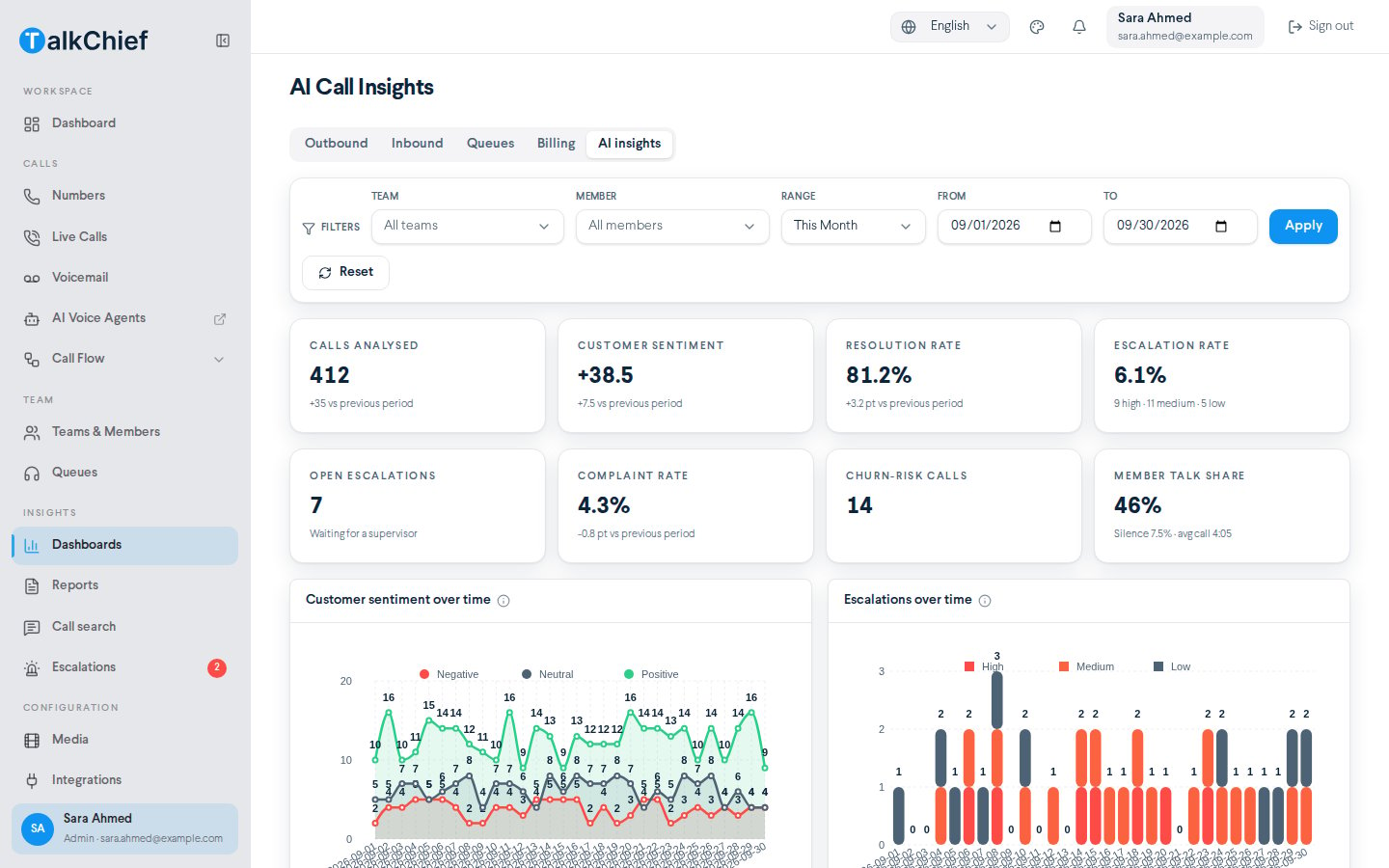
Go to **Insights** > **Dashboards** and select the **AI insights** tab. The page title changes to **AI Call Insights**.
Choose a date **Range**, or set **From** and **To**. Optionally pick a **Team** and a **Member**.
Select **Apply**. Select **Reset** to go back to the defaults.
 ## Key numbers
The cards at the top summarize the selected period. Where earlier data exists, each card compares with the previous period of the same length.
| Card | What it shows |
| - | - |
| **Calls analyzed** | Calls with AI results in the period |
| **Customer sentiment** | % positive minus % negative, from −100 to +100 |
| **Resolution rate** | Share of calls that ended resolved |
| **Escalation rate** | Share of calls escalated, split into high, medium, and low |
| **Open escalations** | Escalations waiting for a supervisor |
| **Complaint rate** | Share of calls with a complaint |
| **Churn-risk calls** | Calls where the customer may leave |
| **Member talk share** | How much of the call your member spoke, with silence and average call length |
## Charts
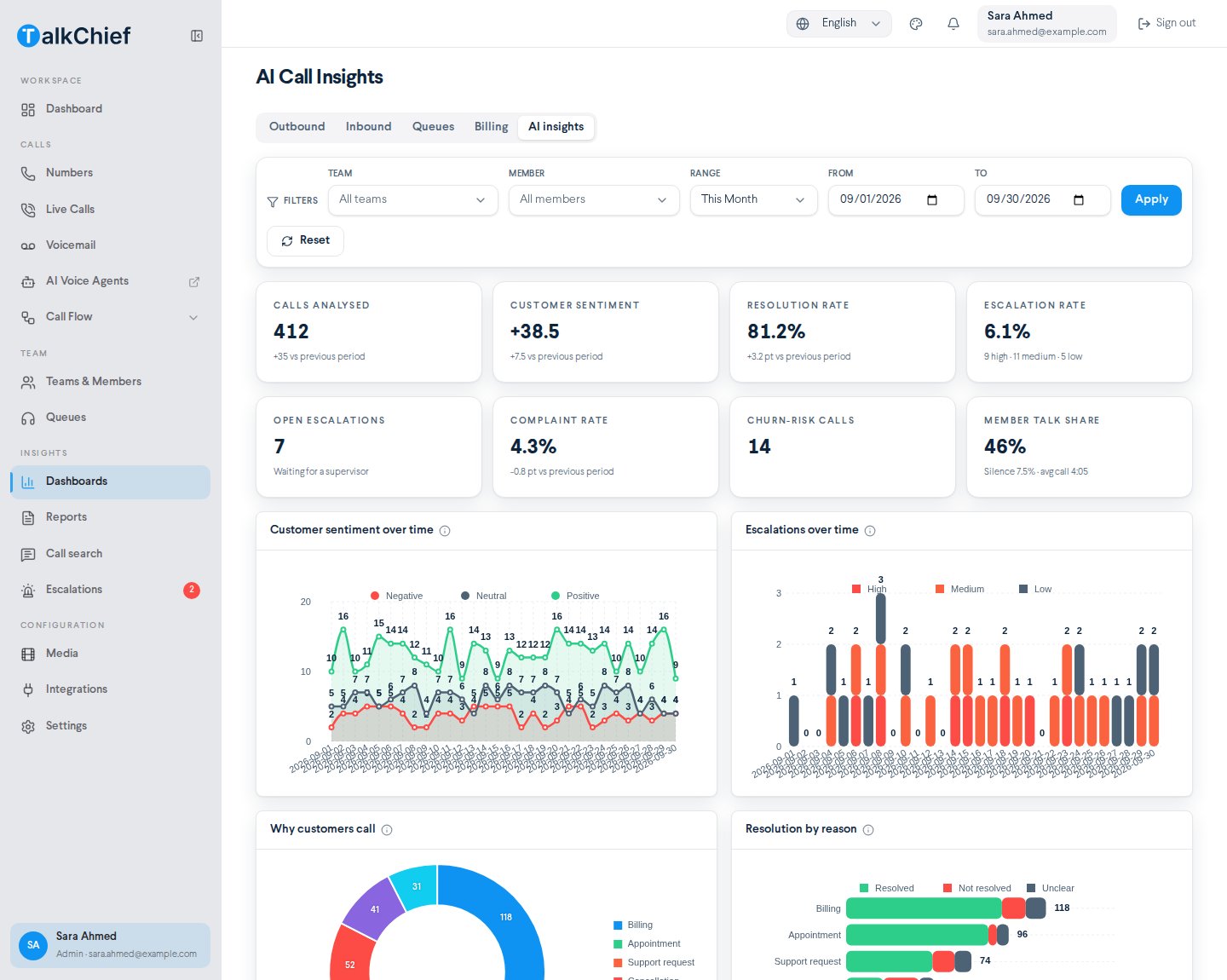
| Chart | What it shows |
| - | - |
| **Customer sentiment over time** | Analyzed calls per day by the customer's overall sentiment: **Positive**, **Neutral**, **Negative** |
| **Escalations over time** | Calls that needed a supervisor, by severity: **High**, **Medium**, **Low** |
| **Why customers call** | The main reason of each call, such as **Support request**, **Billing**, or **Cancellation** |
| **Resolution by reason** | Which reasons end **Resolved**, **Not resolved**, or **Unclear** |
| **Escalation reasons** | What made calls need a supervisor, such as **Asked for a manager** |
| **When problems happen** | Negative or escalated calls by weekday and hour |
## Key numbers
The cards at the top summarize the selected period. Where earlier data exists, each card compares with the previous period of the same length.
| Card | What it shows |
| - | - |
| **Calls analyzed** | Calls with AI results in the period |
| **Customer sentiment** | % positive minus % negative, from −100 to +100 |
| **Resolution rate** | Share of calls that ended resolved |
| **Escalation rate** | Share of calls escalated, split into high, medium, and low |
| **Open escalations** | Escalations waiting for a supervisor |
| **Complaint rate** | Share of calls with a complaint |
| **Churn-risk calls** | Calls where the customer may leave |
| **Member talk share** | How much of the call your member spoke, with silence and average call length |
## Charts
| Chart | What it shows |
| - | - |
| **Customer sentiment over time** | Analyzed calls per day by the customer's overall sentiment: **Positive**, **Neutral**, **Negative** |
| **Escalations over time** | Calls that needed a supervisor, by severity: **High**, **Medium**, **Low** |
| **Why customers call** | The main reason of each call, such as **Support request**, **Billing**, or **Cancellation** |
| **Resolution by reason** | Which reasons end **Resolved**, **Not resolved**, or **Unclear** |
| **Escalation reasons** | What made calls need a supervisor, such as **Asked for a manager** |
| **When problems happen** | Negative or escalated calls by weekday and hour |
 Use **When problems happen** to plan staffing. If negative calls cluster at certain hours, add coverage or coaching for those shifts.
## Team and member scorecards
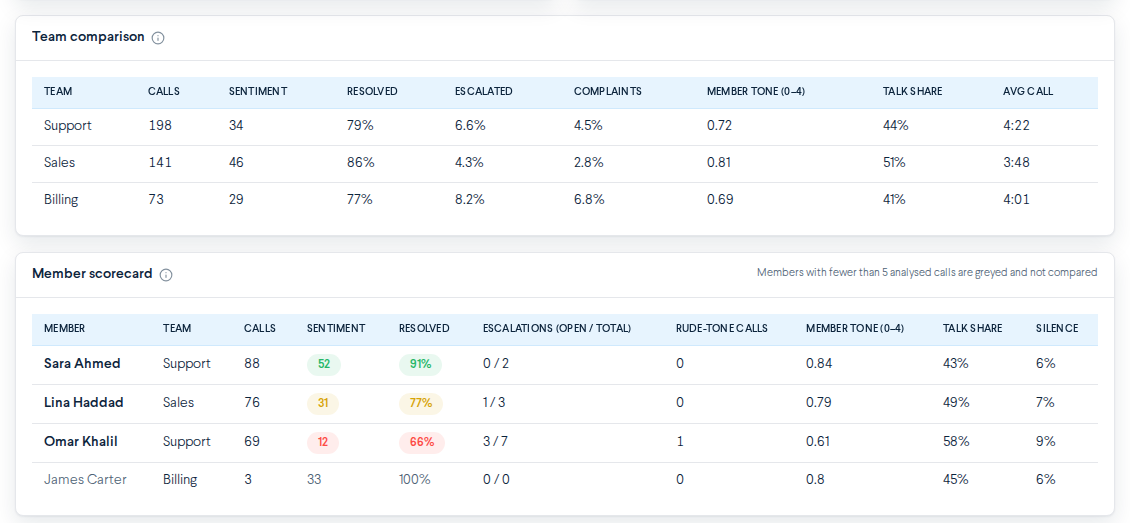
**Team comparison** shows quality per team for the selected period:
* **Calls**, **Sentiment**, **Resolved**, **Escalated**, **Complaints**
* **Member tone (0–4)**, **Talk share**, **Avg call**
**Member scorecard** shows quality per member:
* **Member**, **Team**, **Calls**, **Sentiment**, **Resolved**
* **Escalations (open / total)**, **Rude-tone calls**, **Member tone (0–4)**, **Talk share**, **Silence**
Colors in the member scorecard compare each member with the average of the listed members:
* **Green**: at or above the average.
* **Amber**: within 10% below.
* **Red**: more than 10% below.
Members with fewer than 5 analyzed calls are grayed out and not compared.
Use **When problems happen** to plan staffing. If negative calls cluster at certain hours, add coverage or coaching for those shifts.
## Team and member scorecards
**Team comparison** shows quality per team for the selected period:
* **Calls**, **Sentiment**, **Resolved**, **Escalated**, **Complaints**
* **Member tone (0–4)**, **Talk share**, **Avg call**
**Member scorecard** shows quality per member:
* **Member**, **Team**, **Calls**, **Sentiment**, **Resolved**
* **Escalations (open / total)**, **Rude-tone calls**, **Member tone (0–4)**, **Talk share**, **Silence**
Colors in the member scorecard compare each member with the average of the listed members:
* **Green**: at or above the average.
* **Amber**: within 10% below.
* **Red**: more than 10% below.
Members with fewer than 5 analyzed calls are grayed out and not compared.
 AI insights are generated automatically. Use them to decide which calls to review, not as the only basis for performance decisions. Open the transcript and recording before you act.
## Troubleshooting
AI insights appear once AI transcription is on and calls in the period have been processed. Select **Open AI transcription settings** to check coverage, or pick a longer range.
The member had no analyzed calls in the period, or is outside your teams if you are a supervisor.
## Related
Review and acknowledge escalated calls.
Find the calls behind a trend.
Call volume, queues, and billing dashboards.
Choose which calls are analyzed.
This documentation is built and hosted on [Mintlify](https://mintlify.com), a developer documentation platform.
AI insights are generated automatically. Use them to decide which calls to review, not as the only basis for performance decisions. Open the transcript and recording before you act.
## Troubleshooting
AI insights appear once AI transcription is on and calls in the period have been processed. Select **Open AI transcription settings** to check coverage, or pick a longer range.
The member had no analyzed calls in the period, or is outside your teams if you are a supervisor.
## Related
Review and acknowledge escalated calls.
Find the calls behind a trend.
Call volume, queues, and billing dashboards.
Choose which calls are analyzed.
This documentation is built and hosted on [Mintlify](https://mintlify.com), a developer documentation platform.