> ## Documentation Index
> Fetch the complete documentation index at: https://docs.talkchief.io/llms.txt
> Use this file to discover all available pages before exploring further.
# AI Voice Agents overview | TalkChief
> Learn what TalkChief AI Voice Agents do, how inbound agents and outbound campaigns differ, where to find them, and how per-minute pricing works.
TalkChief AI Voice Agents answer and place phone calls for your business. An agent greets the caller, follows your instructions, looks up answers in your documents, runs approved actions, and transfers to a person when needed. Every call gets a transcript and a charge in **Call reports**.
You need a TalkChief admin or supervisor account to open AI Voice Agents. Calls are charged to your TalkChief wallet, which must hold at least \$10.
## Open AI Voice Agents
Sign in to the TalkChief web app with an admin or supervisor account.
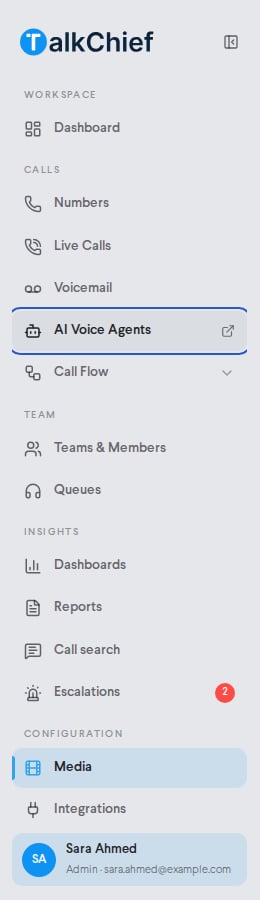
In the sidebar, under calls, click **AI Voice Agents**. The agents workspace opens in a new tab at agents.talkchief.io.
 ## Inbound agents and outbound campaigns
The agents workspace has two ways to work.
| | Inbound agents | Outbound campaigns |
| - | - | - |
| What it does | Answers calls that reach your numbers | Calls a list of leads for you |
| Where you build it | **Inbound agents** | **Campaigns** |
| Who it sounds like | The agent's own persona and voice | A reusable caller profile |
| What it says | The agent's objective and greeting | The campaign's purpose, first line, and Goal playbook |
| How calls arrive | A call flow step sends calls to the agent | The campaign dials leads inside a calling window |
## Find your way around
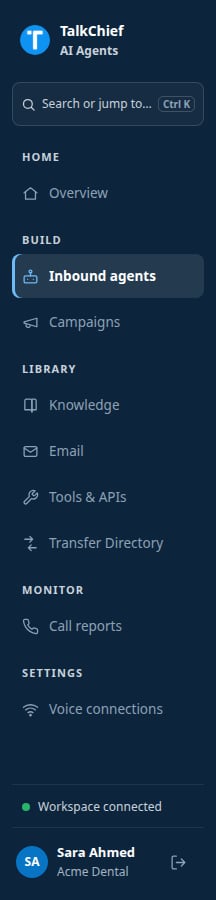
The sidebar groups every page by task.
| Group | Page | Use it to |
| - | - | - |
| Home | **Overview** | See recent usage, calls in progress, and items that need attention |
| Build | **Inbound agents** | Create and edit agents that answer calls |
| Build | **Campaigns** | Create outbound campaigns and caller profiles |
| Library | **Knowledge** | Upload reference documents once for the whole workspace |
| Library | **Email** | Connect one sender address the agents can use |
| Library | **Tools & APIs** | Add MCP connectors and Business APIs |
| Library | **Transfer Directory** | List the people and queues agents can transfer to |
| Monitor | **Call reports** | Review transcripts, outcomes, and charges |
| Settings | **Voice connections** | See the phone connections used by agents and caller profiles |
## Inbound agents and outbound campaigns
The agents workspace has two ways to work.
| | Inbound agents | Outbound campaigns |
| - | - | - |
| What it does | Answers calls that reach your numbers | Calls a list of leads for you |
| Where you build it | **Inbound agents** | **Campaigns** |
| Who it sounds like | The agent's own persona and voice | A reusable caller profile |
| What it says | The agent's objective and greeting | The campaign's purpose, first line, and Goal playbook |
| How calls arrive | A call flow step sends calls to the agent | The campaign dials leads inside a calling window |
## Find your way around
The sidebar groups every page by task.
| Group | Page | Use it to |
| - | - | - |
| Home | **Overview** | See recent usage, calls in progress, and items that need attention |
| Build | **Inbound agents** | Create and edit agents that answer calls |
| Build | **Campaigns** | Create outbound campaigns and caller profiles |
| Library | **Knowledge** | Upload reference documents once for the whole workspace |
| Library | **Email** | Connect one sender address the agents can use |
| Library | **Tools & APIs** | Add MCP connectors and Business APIs |
| Library | **Transfer Directory** | List the people and queues agents can transfer to |
| Monitor | **Call reports** | Review transcripts, outcomes, and charges |
| Settings | **Voice connections** | See the phone connections used by agents and caller profiles |
 Library items are shared. You set up a document, email sender, tool, or transfer destination once. Then you grant it to each inbound agent or campaign that needs it.
## Pricing
AI voice agent calls cost **\$0.15 per connected minute**, or the usage-based cost of the call if that is higher. The charge follows the call's connected AI time.
* Failed, busy, and unanswered attempts have no per-minute charge.
* When the agent transfers a caller to a person, charging stops at the transfer.
* Your wallet must hold at least **\$10** before the agent takes or places a call.
You see each call's charge in **Call reports**. See [Plans and pricing](/plans-and-pricing) for wallet top-ups.
## What agents can and cannot do
Agents can:
* Speak English, Arabic, or Hebrew, or detect the caller's language.
* Search documents you grant them.
* Call your business systems through Business APIs and MCP connectors.
* Send email from your workspace sender.
* Transfer to approved people and queues, end calls, send keypad tones, and record do-not-call requests.
Agents do not record call audio. Call reports keep the written transcript only. Agents also do not run phone menus (IVR); build menus in your [call flow](/phone/call-flows) and route a menu option to the agent.
## FAQ
Your plan sets an AI agent limit. The **Inbound agents** page shows how many you use, for example "2 of 3 AI agents". To get more, delete an agent you no longer need or ask TalkChief support to raise the limit.
Not for inbound agents. Click **Save changes** and new calls use the updated settings. Outbound caller profiles have a **Publish caller profile** step before their first campaign.
Yes. For inbound agents, turn on **Disclose AI when asked**. In outbound campaigns the agent always answers truthfully if a lead asks directly.
## Related pages
Set the persona, greeting, language, and voice.
Send calls on your numbers to an inbound agent.
Call a lead list with a campaign.
Review transcripts and charges.
This documentation is built and hosted on [Mintlify](https://mintlify.com), a developer documentation platform.
Library items are shared. You set up a document, email sender, tool, or transfer destination once. Then you grant it to each inbound agent or campaign that needs it.
## Pricing
AI voice agent calls cost **\$0.15 per connected minute**, or the usage-based cost of the call if that is higher. The charge follows the call's connected AI time.
* Failed, busy, and unanswered attempts have no per-minute charge.
* When the agent transfers a caller to a person, charging stops at the transfer.
* Your wallet must hold at least **\$10** before the agent takes or places a call.
You see each call's charge in **Call reports**. See [Plans and pricing](/plans-and-pricing) for wallet top-ups.
## What agents can and cannot do
Agents can:
* Speak English, Arabic, or Hebrew, or detect the caller's language.
* Search documents you grant them.
* Call your business systems through Business APIs and MCP connectors.
* Send email from your workspace sender.
* Transfer to approved people and queues, end calls, send keypad tones, and record do-not-call requests.
Agents do not record call audio. Call reports keep the written transcript only. Agents also do not run phone menus (IVR); build menus in your [call flow](/phone/call-flows) and route a menu option to the agent.
## FAQ
Your plan sets an AI agent limit. The **Inbound agents** page shows how many you use, for example "2 of 3 AI agents". To get more, delete an agent you no longer need or ask TalkChief support to raise the limit.
Not for inbound agents. Click **Save changes** and new calls use the updated settings. Outbound caller profiles have a **Publish caller profile** step before their first campaign.
Yes. For inbound agents, turn on **Disclose AI when asked**. In outbound campaigns the agent always answers truthfully if a lead asks directly.
## Related pages
Set the persona, greeting, language, and voice.
Send calls on your numbers to an inbound agent.
Call a lead list with a campaign.
Review transcripts and charges.
This documentation is built and hosted on [Mintlify](https://mintlify.com), a developer documentation platform.