> ## Documentation Index
> Fetch the complete documentation index at: https://docs.talkchief.io/llms.txt
> Use this file to discover all available pages before exploring further.
# AI voice agent call reports | TalkChief
> Review every TalkChief AI voice agent call: outcome, duration, charge, and the full diarized transcript. Filter calls and export them as CSV.
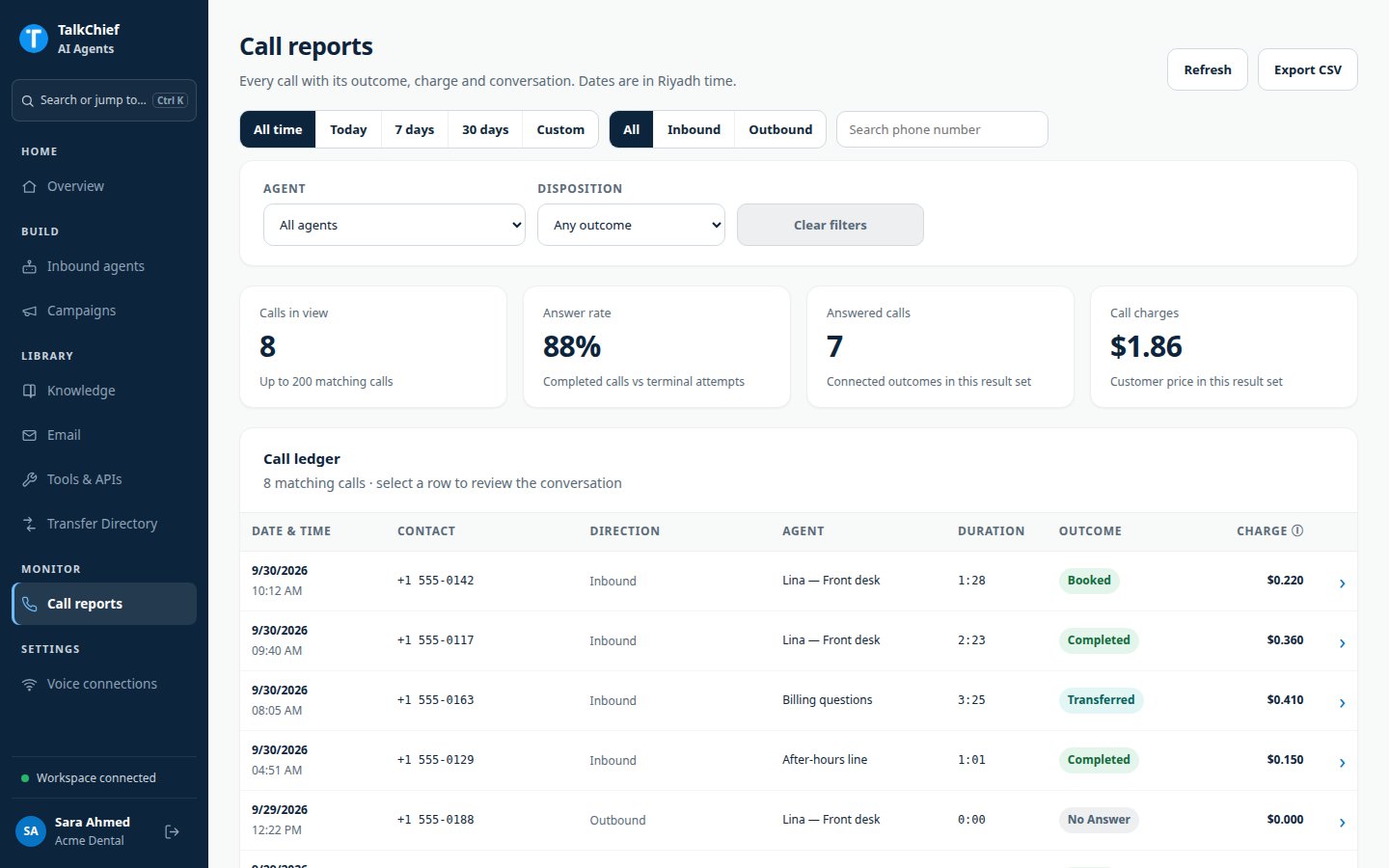
**Call reports** lists every call your inbound agents and campaigns handle. For each call you see the outcome, duration, charge, and a written transcript of the conversation.
Dates and filters use Riyadh time. Call audio is not recorded, so reports contain the transcript only.
## Open call reports
In the agents workspace sidebar, under **Monitor**, click **Call reports**. The page refreshes on its own every few seconds.
The top of the page shows four totals for the calls that match your date, direction, and filter-panel filters:
| Total | Meaning |
| - | - |
| **Calls in view** | Calls that match your filters, up to 200 |
| **Answer rate** | Answered calls as a share of finished attempts |
| **Answered calls** | Calls that connected |
| **Call charges** | The total charge for the calls in view |
 ## Find a call
Use the quick filters:
* Date range: **All time**, **Today**, **7 days**, **30 days**, or **Custom**.
* Direction: **All**, **Inbound**, or **Outbound**.
* **Search phone number** to match the contact's number. This search only narrows the rows shown in the **Call ledger**. The totals and **Export CSV** ignore it.
The filter panel adds **Agent** and **Disposition**. Click **Clear filters** to reset.
The **Call ledger** shows **Date & time**, **Contact**, **Direction**, **Agent**, **Duration**, **Outcome**, and **Charge**. Rehearsal calls carry the **Rehearsal** label.
## Read a call report
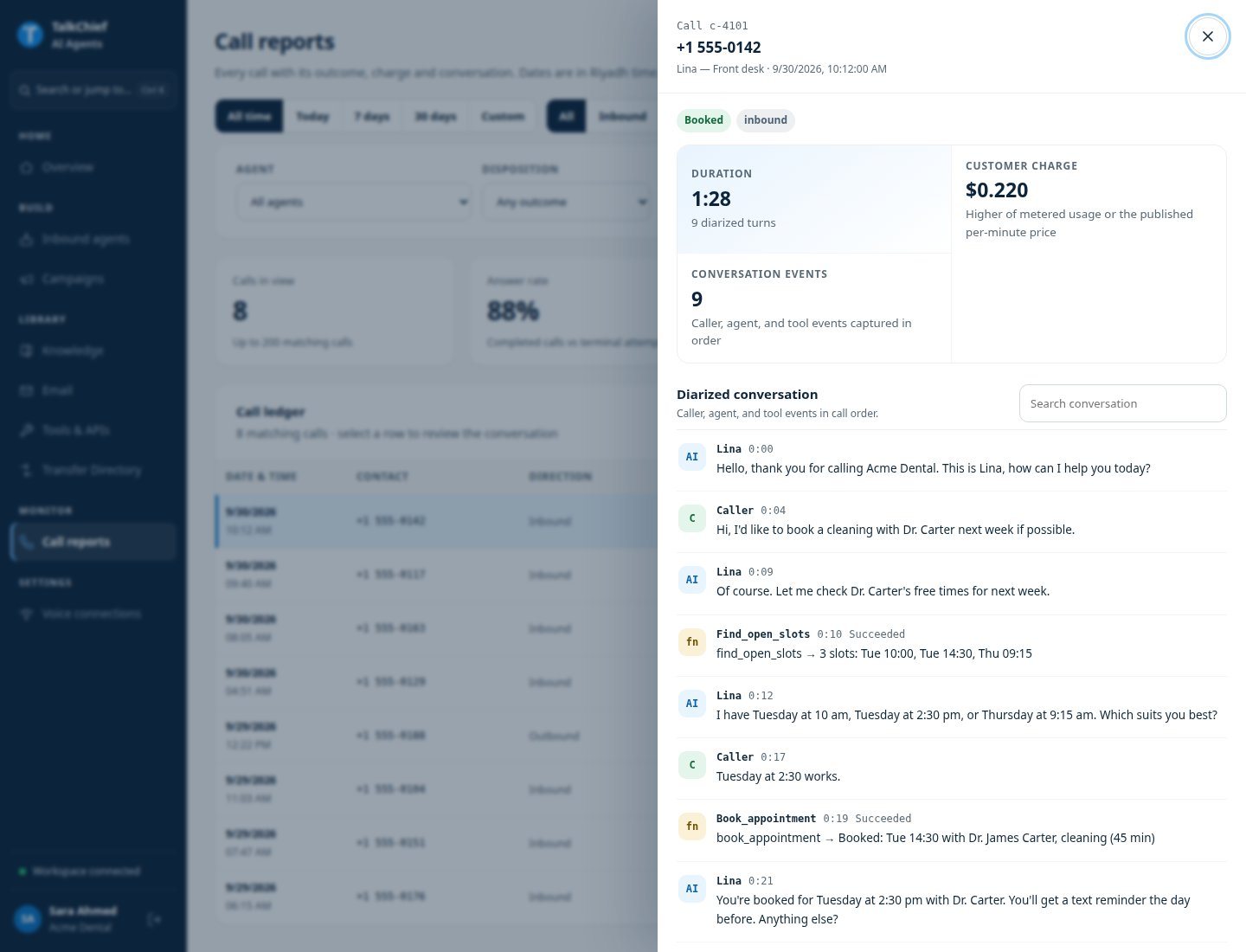
Click a row to open the report.
| Item | What it shows |
| - | - |
| **Duration** or **AI time** | How long the AI handled the call. For transferred calls, **AI time** stops at the transfer |
| **Customer charge** | The amount charged for this call |
| **Conversation events** | How many caller, agent, and tool events were captured |
| **Diarized conversation** | The transcript in call order, labeled by speaker |
In the transcript, each line is marked as the caller, the agent (**AI**), or a tool. Tool lines show the tool's result status. Lines the caller talked over are marked **interrupted**. Use **Search conversation** to find a word.
A transferred call shows **Transferred to a human** with the destination and time.
## Find a call
Use the quick filters:
* Date range: **All time**, **Today**, **7 days**, **30 days**, or **Custom**.
* Direction: **All**, **Inbound**, or **Outbound**.
* **Search phone number** to match the contact's number. This search only narrows the rows shown in the **Call ledger**. The totals and **Export CSV** ignore it.
The filter panel adds **Agent** and **Disposition**. Click **Clear filters** to reset.
The **Call ledger** shows **Date & time**, **Contact**, **Direction**, **Agent**, **Duration**, **Outcome**, and **Charge**. Rehearsal calls carry the **Rehearsal** label.
## Read a call report
Click a row to open the report.
| Item | What it shows |
| - | - |
| **Duration** or **AI time** | How long the AI handled the call. For transferred calls, **AI time** stops at the transfer |
| **Customer charge** | The amount charged for this call |
| **Conversation events** | How many caller, agent, and tool events were captured |
| **Diarized conversation** | The transcript in call order, labeled by speaker |
In the transcript, each line is marked as the caller, the agent (**AI**), or a tool. Tool lines show the tool's result status. Lines the caller talked over are marked **interrupted**. Use **Search conversation** to find a word.
A transferred call shows **Transferred to a human** with the destination and time.
 ## Understand the charge
Each call costs **\$0.15 per connected minute**, or the usage-based cost if that is higher. The charge column can show:
| Value | Meaning |
| - | - |
| An amount, such as \$0.450 | The final charge |
| **Pending** | The call is still in progress |
| **Price pending** | The call ended and the charge is being finalized |
Failed, busy, and unanswered attempts have no per-minute charge. Minutes after a transfer to a person are not charged as AI time.
## Export calls
Click **Export CSV** to download the calls that match your date range, direction, **Agent**, and **Disposition** filters. The phone number search is not applied to the file. The file includes the call ID, start time, contact, agent, direction, call type (standard or rehearsal), duration, AI duration, disposition, transfer details, and price.
## FAQ
The call connected but no speech was transcribed, for example when the caller hung up at once.
No. Agents do not record call audio. Use the transcript to review the conversation.
Yes. In an agent's **Test** panel, click **Open report** under **Latest call**. In a campaign's **Activity & results**, click **Inspect**.
Yes. Deleting an agent or campaign keeps its call reports and transcripts.
## Related pages
Pricing and how agents work.
Track campaign results.
This documentation is built and hosted on [Mintlify](https://mintlify.com), a developer documentation platform.
## Understand the charge
Each call costs **\$0.15 per connected minute**, or the usage-based cost if that is higher. The charge column can show:
| Value | Meaning |
| - | - |
| An amount, such as \$0.450 | The final charge |
| **Pending** | The call is still in progress |
| **Price pending** | The call ended and the charge is being finalized |
Failed, busy, and unanswered attempts have no per-minute charge. Minutes after a transfer to a person are not charged as AI time.
## Export calls
Click **Export CSV** to download the calls that match your date range, direction, **Agent**, and **Disposition** filters. The phone number search is not applied to the file. The file includes the call ID, start time, contact, agent, direction, call type (standard or rehearsal), duration, AI duration, disposition, transfer details, and price.
## FAQ
The call connected but no speech was transcribed, for example when the caller hung up at once.
No. Agents do not record call audio. Use the transcript to review the conversation.
Yes. In an agent's **Test** panel, click **Open report** under **Latest call**. In a campaign's **Activity & results**, click **Inspect**.
Yes. Deleting an agent or campaign keeps its call reports and transcripts.
## Related pages
Pricing and how agents work.
Track campaign results.
This documentation is built and hosted on [Mintlify](https://mintlify.com), a developer documentation platform.